Weekly Reflection #8
Over the past week, we have explored inclusive technologies and accessibility features to ensure the technologies we use are available and usable for all learners. This connects to UDL, which means Universal Design for Learning, which can be applied in all practices, whether in the classroom or online. We are focused specifically on the online format through technology for inclusion. Some technologies can support a diverse range of learners in UDL, and, when used, help students be more successful in their schooling.
In terms of accessible tools to support UDL through educational technologies, I find that text-to-speech and screen readers are widely used in schools. Text-to-speech and its reverse are important tools for students who may be behind academically, allowing them to continue working independently, boosting their confidence, and providing the support they need. Screen readers are tools that read on-screen text aloud to students. This allows students to gain a verbal understanding of texts they may not yet be able to read and can also support students who are academically lower.
Immersive learning technologies are becoming more common, allowing students to take virtual field trips and offering a broader range of experiences they might not otherwise have. These are great for learners, but also have some challenges. One challenge could be access to this feature, as VR and AR can be expensive, especially for schools. As discussed in the linked article above, students may face other challenges, such as cybersickness and time limits on headset use. These technologies, if barriers are addressed, can help students access a much broader range of learning and give them a broader life experience that connects with their learning.
Overall, ed tech can be very useful, supporting students by providing a more interactive and personalized learning experience. These tools can help students collaborate with each other, especially through online platforms, so they don’t have to share a computer. Digital tools can help us track student learning, identify learning gaps, and improve educational technologies to better support learning.
During class, we dove into a feature that allows you to see how accessible a website is. This website is called WAVE, which stands for Web Accessibility Evaluation Tool. This website analyzes a URL to assess its accessibility and identifies issues such as errors, contrast problems, structural issues, and other alerts. Using all this information, the feature gives the URL website a score on a scale of 1-10. When I plugged my WordPress website (this website!) into the tool, it got a score of 4.2. This score is quite low, and several errors are shown below. The biggest problem the website has is the contrast between the background and the text. By changing these colours, the website would improve significantly. Using this feature, I tested another website called Cool Math Games. This website scored a 9.5 out of 10. This score is very good for accessibility, with no errors, no contrast errors, and over 100 features. The area that is still lacking on this website is alerts, which means there is some redundant text, possible headings, and suspicious links (which I assume are ads). This still provides great accessibility and supports most users on this website.
Adaptive technologies: I do not remember many being used during my schooling, other than laptops. Having been in schools today, I see many uses of adaptive technologies. The use of computers (Chromebooks specifically) has increased, as they are an important feature, especially for accessibility. Some students use laptops for writing, whether that’s speech-to-text or vice versa. In other classrooms, I have seen many teachers use a microphone that connects directly to hard-of-hearing students’ hearing aids to help them hear instruction or lessons better. This is essential, as some students may not yet be able to read or write, and beginning with support can open the door for them to express themselves and potentially flourish. Accessibility looks different for every student, and as we continue to identify students’ needs, student growth will be evident. Though accessibility is so important, there are a few challenges in implementing certain aspects. The use of computers will depend on the school and budget. Some schools or districts may not be able to afford this type of technology. Another con mentioned in our group discussion was students becoming overreliant on technology. Students are learning and do want to try things that others are doing and will often take initiative to learn new things, not using their adaptive tech as well.
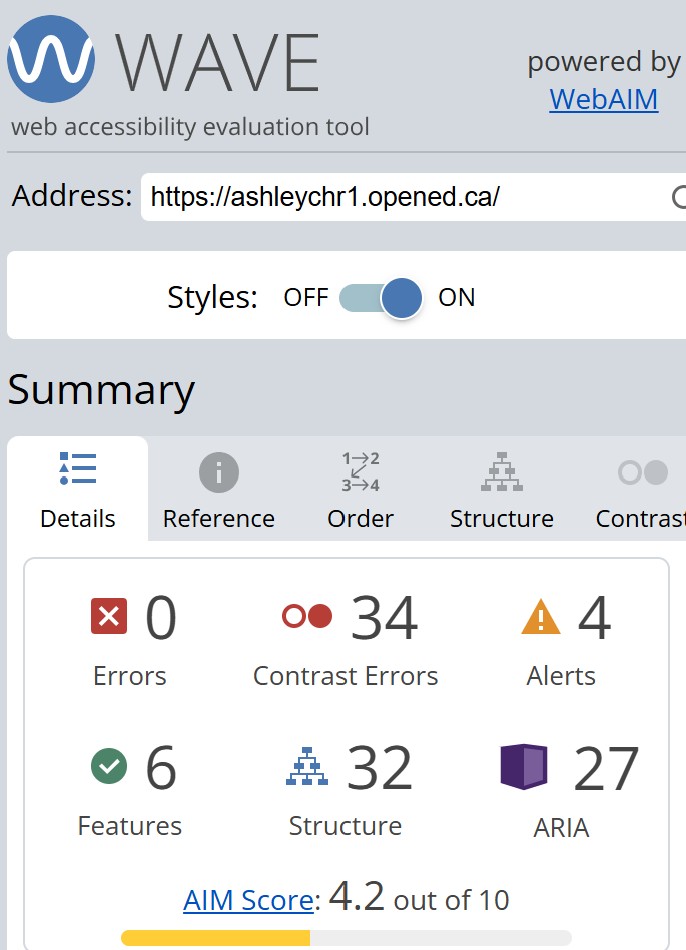
This image should be used to view the website’s results and increase curiosity about using the website on one’s own. Wave Web Accessibility Evaluation Tools. WAVE Web Accessibility Evaluation Tool. (n.d.). https://wave.webaim.org/
Ashley, thank you for reinforcing the importance of inclusion through accessibility. The tools are a great way to help us ensure that Universal Design for Learning remains practical and at the heart of everything digital. I understand that the assessment of our WordPress sites lacks the contrasts in colours and has other default features that need updating. Thanks for sharing the score and source!